Every customer interaction.
One complete picture.
Stop piecing together customer history from five different tools.
JIVIQ brings conversations, meetings, forms, feature requests, and customer context together into one intelligent customer memory — so you always know what happened, what matters, and what to do next.
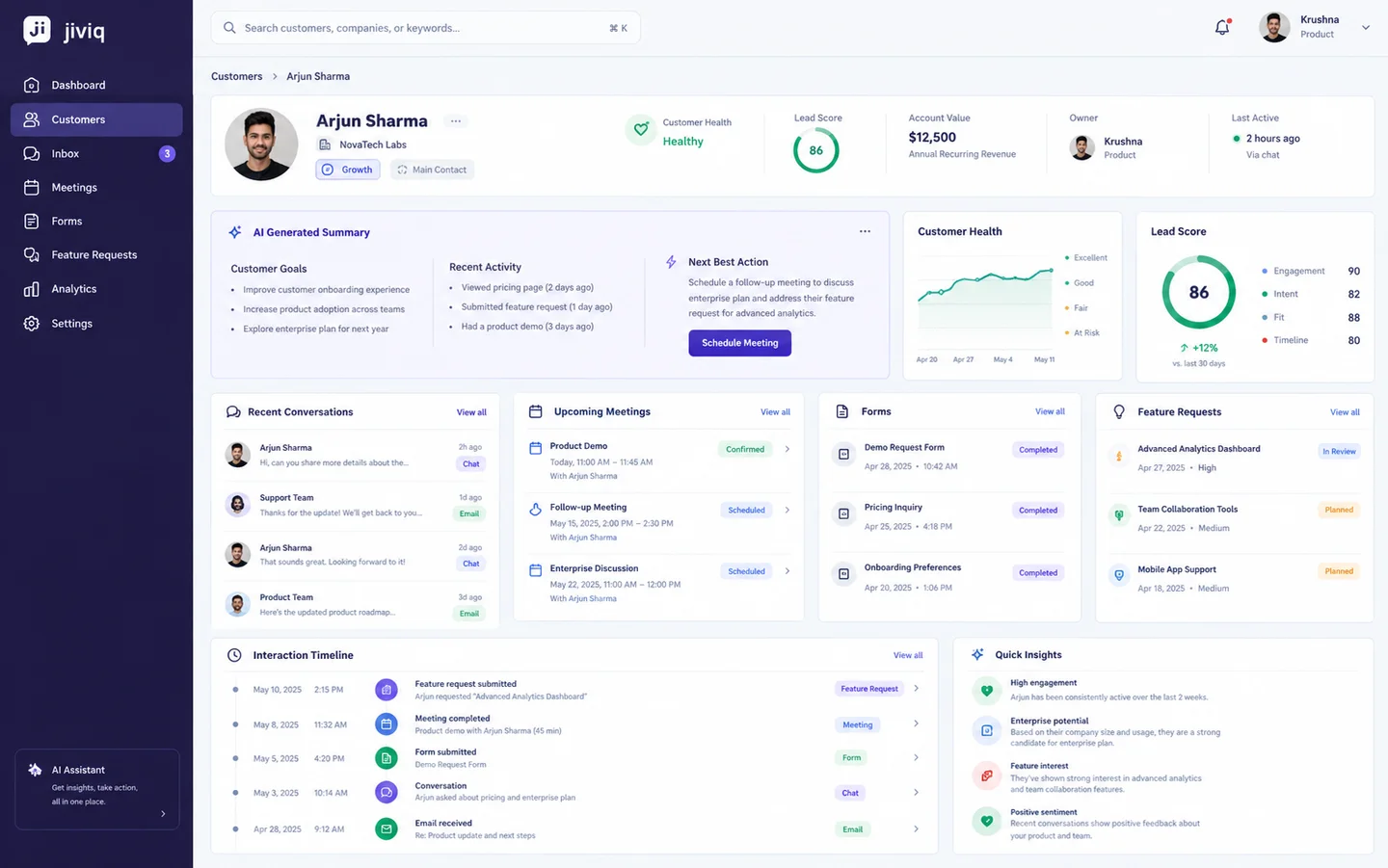
Your customer knows the whole story.
Your tools don't.
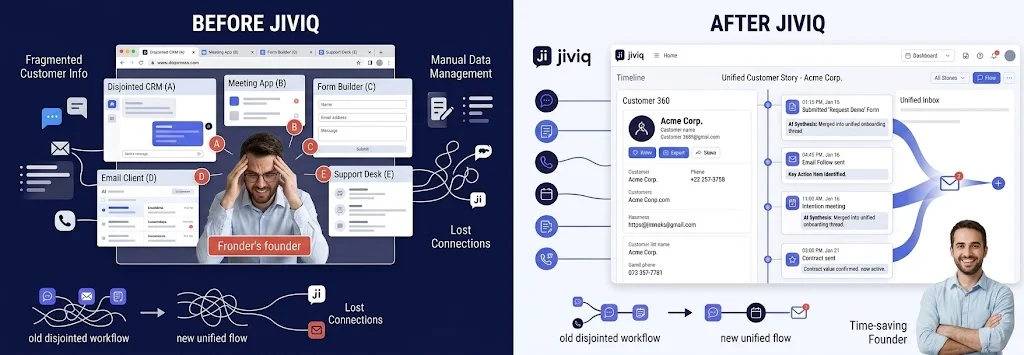
Customer information is scattered across chat, email, forms, calendars, meeting notes, support tools, and spreadsheets. The founder becomes the person responsible for connecting all the dots.
Multiple disconnected tools • Broken context • Manual tab-hopping • Unprepared sales calls • Forgotten customer details.
One single source of truth • Full customer backstory in 5 seconds • Automatic updates without manual CRM logging.
Know the customer
before you talk to them.
JIVIQ automatically connects every meaningful customer interaction, giving your team the context they need without manually searching through different systems.
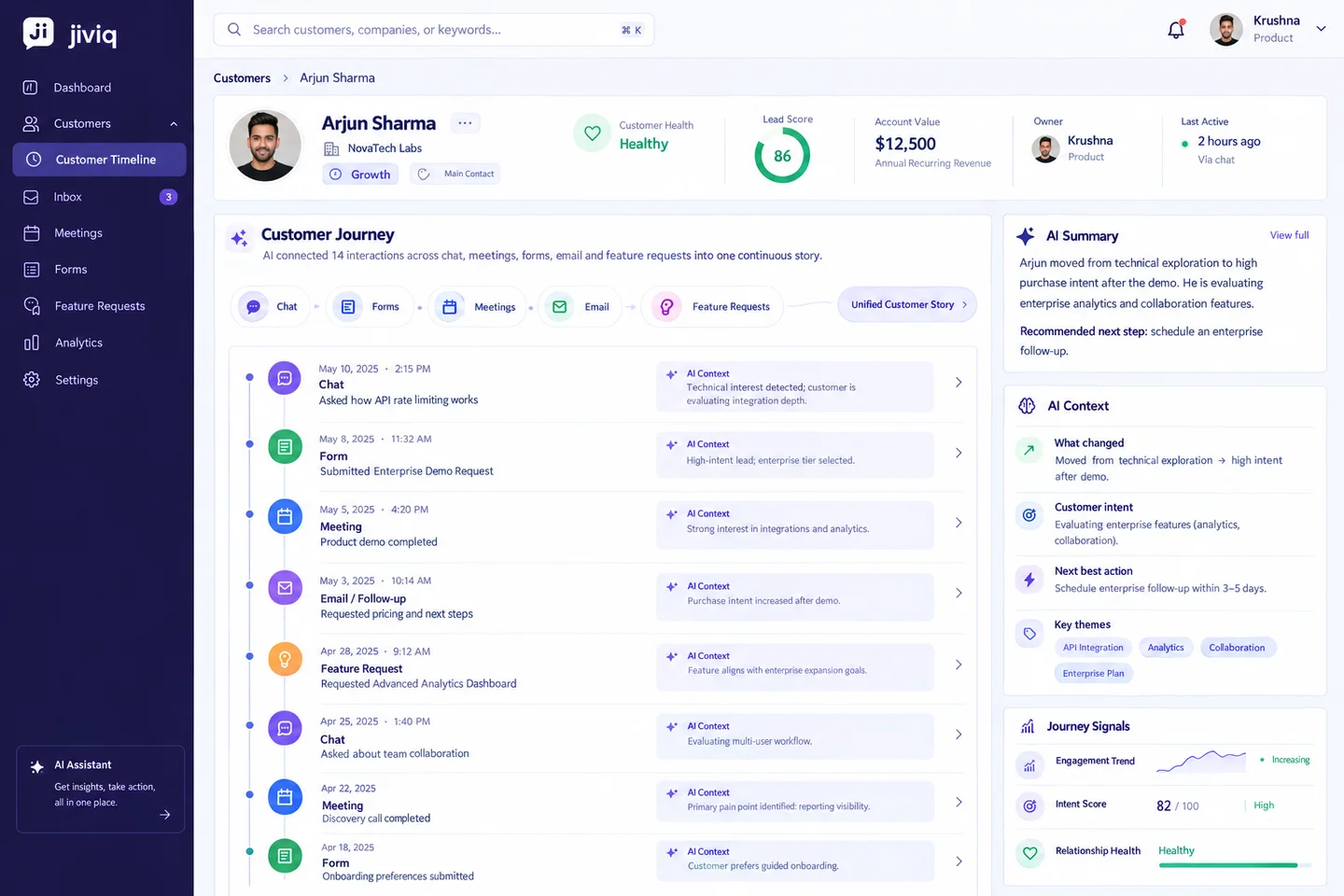
From hundreds of interactions
to one useful summary.
Instead of reading every message and meeting note, JIVIQ automatically synthesizes customer history into actionable intelligence.
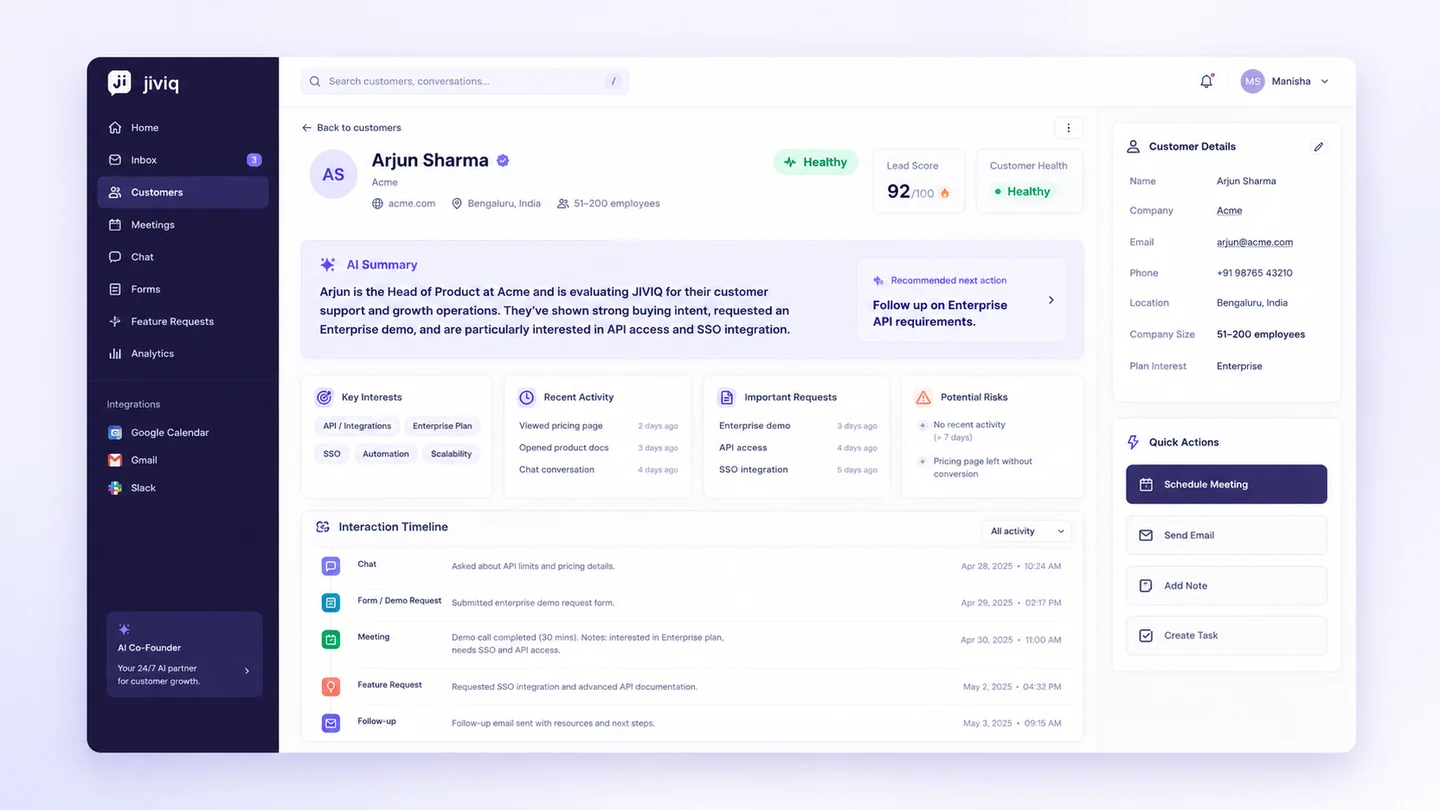
You shouldn't have to connect the dots.
JIVIQ does.
JIVIQ turns individual customer interactions into connected context automatically.
Customer asks a question.
Customer provides information.
Customer discusses requirements.
Customer explains what they need.
Customer 360
JIVIQ combines every conversation, response, recording, and request into one unified customer memory.
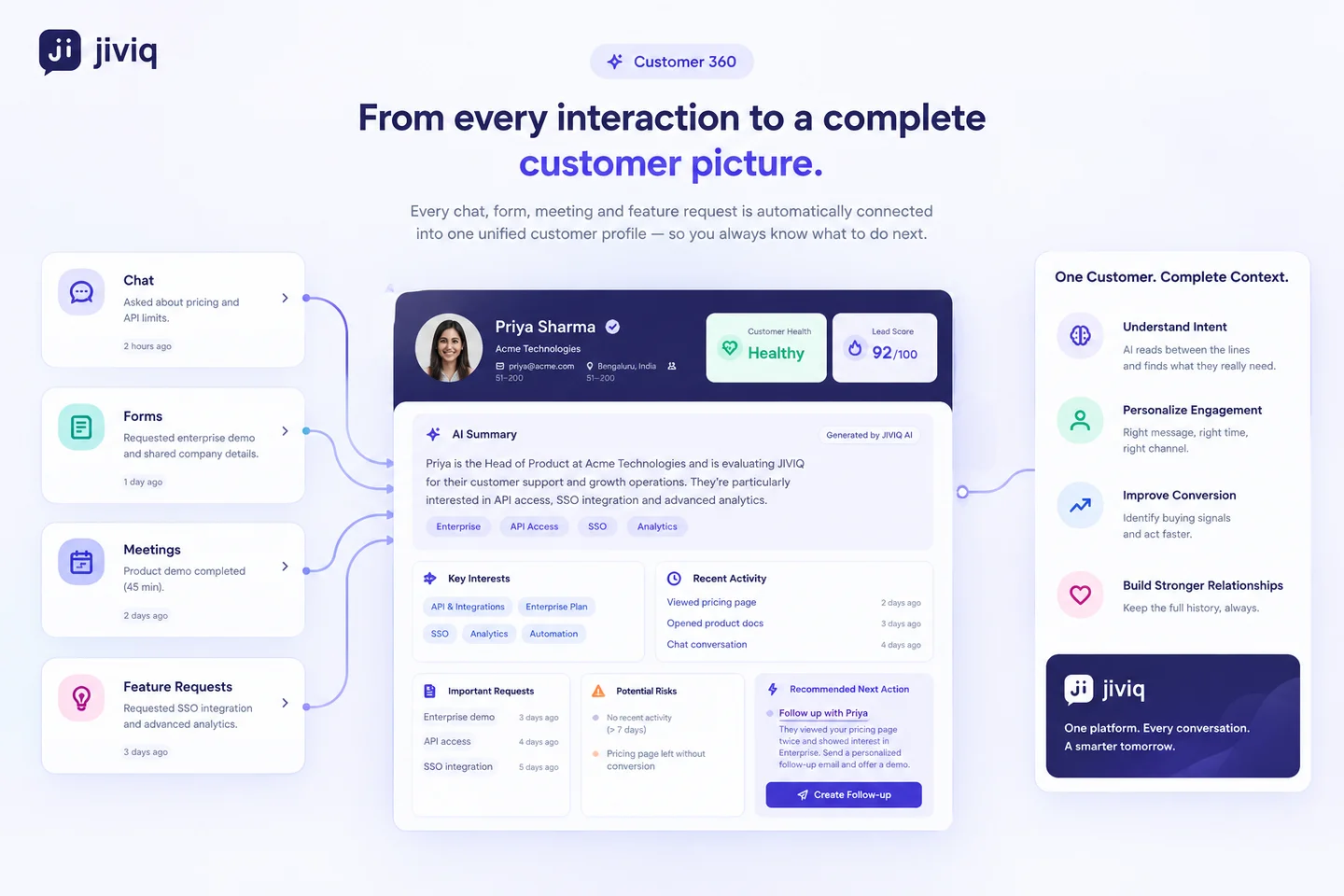
Context is useful.
Knowing what to do next is better.
JIVIQ doesn't just collect customer information. It turns customer history into actionable next steps.
UNDERSTAND
See what the customer wants, what they've discussed, and what matters most.
PRIORITIZE
Identify important requests, buying signals, risks, and opportunities.
ACT
Know exactly what to follow up on next without hesitation or second-guessing.
How much is fragmented customer context costing you?
Every hour spent searching through tools, reading old conversations, recreating meeting context, and manually updating customer information is time taken away from building and growing your business.
The Fragmented Founder Burden
- Multiple tools: Constant tab switching and login fatigue.
- Scattered context: Key details buried across 7 apps.
- Manual updates: Tedious manual notes after every call.
- Lost information: Crucial customer needs fall through cracks.
- Hours spent searching: Precious founder energy wasted.
Unified Customer Operations
- One customer memory: Complete history in a single view.
- Connected interactions: Chats, forms, and meetings united.
- AI-generated context: Automatic background briefings.
- Automatic summaries: Zero manual data entry required.
- Clear next actions: Immediate follow-up recommendations.
Everything you need to know about
JIVIQ Customer 360
Explore 36 in-depth questions and answers across data capture, AI intelligence, security, and founder workflows.
Q1 What exactly is JIVIQ Customer 360?
JIVIQ Customer 360 is an intelligent customer memory layer that automatically unifies every customer interaction — website chat conversations, intake forms, booked meetings, feature requests, and follow-ups — into one continuous, auto-updating profile. Instead of searching through five different apps, founders get full customer backstory and actionable context in seconds.
Q2 How does unified customer memory differ from a traditional CRM?
Traditional CRMs like Salesforce and HubSpot require constant manual data entry, complex custom property schemas, and are architected for large sales teams with dedicated SDRs and AEs. JIVIQ is designed founder-first: it automatically captures and links interactions in the background, generating instant AI summaries with zero manual logging.
Q3 Why is Customer 360 essential for solo founders and lean B2B teams?
When a founder manages product, sales, support, and operations simultaneously, context switching between fragmented apps creates cognitive overload and forgotten details. JIVIQ remembers what every prospect said, what they want, and what was promised, allowing you to walk into every meeting or support interaction completely prepared.
Q4 Does Customer 360 replace standalone point tools?
Yes. JIVIQ combines embeddable chat widgets, qualification intake forms, meeting scheduling, and shared inbox tools into a single platform. Instead of paying for Calendly, Crisp/Intercom, Typeform, and a separate CRM, JIVIQ provides a unified customer operations stack.
Q5 How fast does a customer's unified profile update?
In real time. The moment a customer chats on your website widget, completes a form, books a call, or requests a product feature, the event is immediately indexed, linked to their account, and reflected in their Customer 360 profile.
Q6 Does Customer 360 support both pre-sales leads and paying customers?
Yes. JIVIQ tracks the entire customer lifecycle — from the anonymous website visitor asking pre-sales questions to the qualified lead booking a demo, through to post-onboarding feature requests, renewals, and account expansions.
Q1 How does the live chat widget feed customer context into Customer 360?
The embeddable JIVIQ chat widget automatically logs conversation history, user email, browser metadata, and key topics discussed, directly attributing them to the customer's permanent profile without requiring manual exports.
Q2 How are web forms and intake questionnaires tied to customer profiles?
When a visitor submits an intake form, demo request, or qualification survey, JIVIQ matches the submission by email address and instantly populates their profile with form responses, company size, and budget details.
Q3 How does meeting scheduling integrate with the customer timeline?
When a customer books a time on your JIVIQ scheduling page, meeting details, intake questions, and attendee information attach directly to their timeline. JIVIQ also drafts pre-call briefings and extracts post-meeting action items.
Q4 How does JIVIQ track feature requests and product feedback?
Feature requests filed during chat, meetings, or forms are automatically categorized, tagged to the customer profile, and linked to your product feedback backlog so you know which high-value accounts care about specific features.
Q5 Can Customer 360 link multiple team members from the same company?
Yes. JIVIQ supports account-level grouping by company domain, allowing you to view individual stakeholder histories as well as a consolidated company-wide timeline for multi-seat deals.
Q6 What happens if a user browses anonymously before providing their email?
JIVIQ tracks anonymous session history using persistent visitor tokens. Once the visitor provides their email (via chat, form, or scheduling), their previous anonymous browsing and chat history is retroactively stitched to their unified profile.
Q1 How does JIVIQ generate real-time AI Customer Summaries?
JIVIQ's AI engine analyzes recent timeline events (transcripts, form inputs, meeting notes, feature tags) and synthesizes a concise, structured brief covering core pain points, feature interests, recent activity, and account sentiment.
Q2 How does JIVIQ prevent AI hallucinations in customer summaries?
JIVIQ uses strict grounded context extraction derived directly from actual customer dialogue and structured event logs. It does not invent facts; every point in the summary references verified timestamps and messages in the customer's timeline.
Q3 How are Lead Scores and Customer Health metrics calculated?
Lead Score (0–100) and Health indicators are calculated dynamically based on engagement frequency, form qualification criteria, meeting attendance, feature urgency, and sentiment signals extracted from recent interactions.
Q4 How frequently are AI customer summaries regenerated?
Summaries are updated incrementally whenever meaningful new events occur (e.g., after a new call, a form submission, or a new conversation) and on-demand whenever you open the customer's profile.
Q5 Can I customize what information the AI extracts from conversations?
Yes. You can configure custom extraction rules or tone preferences (e.g., focusing on specific integration requirements, enterprise compliance triggers, or budget indicators).
Q6 Does the AI automatically detect competitor mentions and budget objections?
Yes. JIVIQ automatically flags competitor references, pricing hesitations, and technical blockers, highlighting them in the summary card for quick review.
Q1 What are 'AI Next Actions' and how do they prevent dropped leads?
Based on the customer's latest interaction (e.g. asking for API documentation during a demo), JIVIQ suggests specific, high-priority follow-up tasks with pre-drafted responses, ensuring promising leads never stall.
Q2 How does JIVIQ prepare founders for upcoming sales calls?
JIVIQ prepares a 30-second 'Pre-Call Brief' with bullet points on past discussions, open questions, and customer goals so you can jump on Zoom fully briefed without 15 minutes of pre-call research.
Q3 Can I assign specific customer accounts or follow-ups to teammates?
Yes. Even though JIVIQ is built founder-first, you can add unlimited team members, assign customer ownership, and collaborate on shared timelines without paying per-seat penalties.
Q4 Does JIVIQ send real-time alerts for VIP customer events?
Yes. You can receive real-time alerts via Slack, email, or browser notifications when high-value leads book meetings, request critical features, or show signs of churn risk.
Q5 How does Customer 360 help close the loop when a requested feature is shipped?
When you ship a feature, JIVIQ lets you filter all customers who previously requested or mentioned that feature, making it effortless to send targeted re-engagement messages.
Q6 Can I export customer data or trigger automated webhooks into other platforms?
Yes. You can export complete customer records, activity logs, and summary data in standard formats (CSV, JSON) or sync them via webhooks anytime.
Q1 How is customer data encrypted and stored?
All data is encrypted with AES-256 at rest and TLS 1.3 in transit using high-availability, enterprise-grade cloud infrastructure.
Q2 Are our customer conversations used to train public LLM models?
No. JIVIQ never uses your proprietary customer data, conversations, or notes to train foundation or public AI models. Your customer data remains strictly isolated to your workspace.
Q3 How does JIVIQ Customer 360 handle GDPR and CCPA?
JIVIQ is designed with GDPR and CCPA principles in mind. It keeps only the data the product needs, and you can request a copy or deletion of a customer's data at any time.
Q4 Where is JIVIQ cloud infrastructure hosted?
JIVIQ infrastructure is hosted on Google Cloud Platform and Firebase, in data centers that Google independently audits under SOC 2, with automated daily backups.
Q5 Can customers exercise their Right to be Forgotten (data deletion)?
Yes. Email us a deletion request for any customer contact, and we will confirm what we deleted.
Q6 Who owns the customer intelligence and timeline data stored in JIVIQ?
You maintain 100% ownership over all raw customer data, synthesized summaries, and generated timeline intelligence.
Q1 How quickly can I install and launch Customer 360 on my website?
Setup takes less than 5 minutes. Simply paste a single script tag on your website to activate the chat widget and form capture, or connect your custom domain.
Q2 Do I need any coding knowledge or software engineers to use JIVIQ?
No. JIVIQ is completely no-code friendly. Everything is configured via a modern, intuitive dashboard without writing any custom code.
Q3 How does the 14-day free trial work?
You get unrestricted access to all Customer 360 features, AI summaries, scheduling, and chat for 14 days. No credit card is required to get started.
Q4 What are the pricing tiers for JIVIQ Customer 360?
JIVIQ uses transparent, flat-rate pricing per workspace with unlimited teammates and unlimited human conversations: Co-Pilot is $19/mo ($180/yr) and Auto-Pilot is $49/mo ($470/yr). No surprise per-seat traps.
Q5 Can I import existing customer contact lists and CSVs into JIVIQ?
Yes. You can import existing customer contacts, notes, and CSV spreadsheets directly through the onboarding importer.
Q6 What level of customer support is included with JIVIQ?
All plans receive direct founder and priority email support (support@jiviq.com) with fast response times to help you optimize your customer operations.
Customer 360 runs on JIVIQ Context — the intelligence layer that connects chat, calls, meetings, and email into one living customer memory.
Stop searching for customer context.
Start with it.
JIVIQ gives you one complete memory of every customer — from the first conversation to the latest request.