What Is the Knowledge Base?
A beginner-friendly guide to understanding how the JIVIQ Knowledge Base works. Learn why accurate business facts matter, how your website and documents become knowledge, and how your AI assistant answers customer questions with grounded accuracy.
What Is Knowledge Base?
Core concepts & how AI learns
Currently ReadingCreate Knowledge Base
Set up your workspace repository
Up Next →Import Website
Sync pages, URLs & sitemaps
Explore →Upload Documents
Index PDFs, Word docs & guides
Explore →Refresh Content
Re-sync website changes on demand
Explore →Connecting from Your Website Installation Journey
Now that you have successfully embedded and verified your JIVIQ chat widget on your live site (via our Installation Guide, Domain Setup, Widget Code Copying, HTML Placement, and Widget Verification), the next crucial step is giving your AI assistant the real facts it needs to represent your business.
1. What the Knowledge Base Is
Think of the JIVIQ Knowledge Base as your business’s private, organized library. It is the single home where all of your verified company facts live—including your pricing sheets, product specifications, office hours, service descriptions, return policies, and frequently asked questions.
When visitors visit your website and ask questions in the JIVIQ chat widget, your AI assistant does not invent answers or guess what your business offers. Instead, it instantly consults this private library, finds the exact sentence or paragraph that answers the customer's question, and presents the answer in clean, polite, human language.
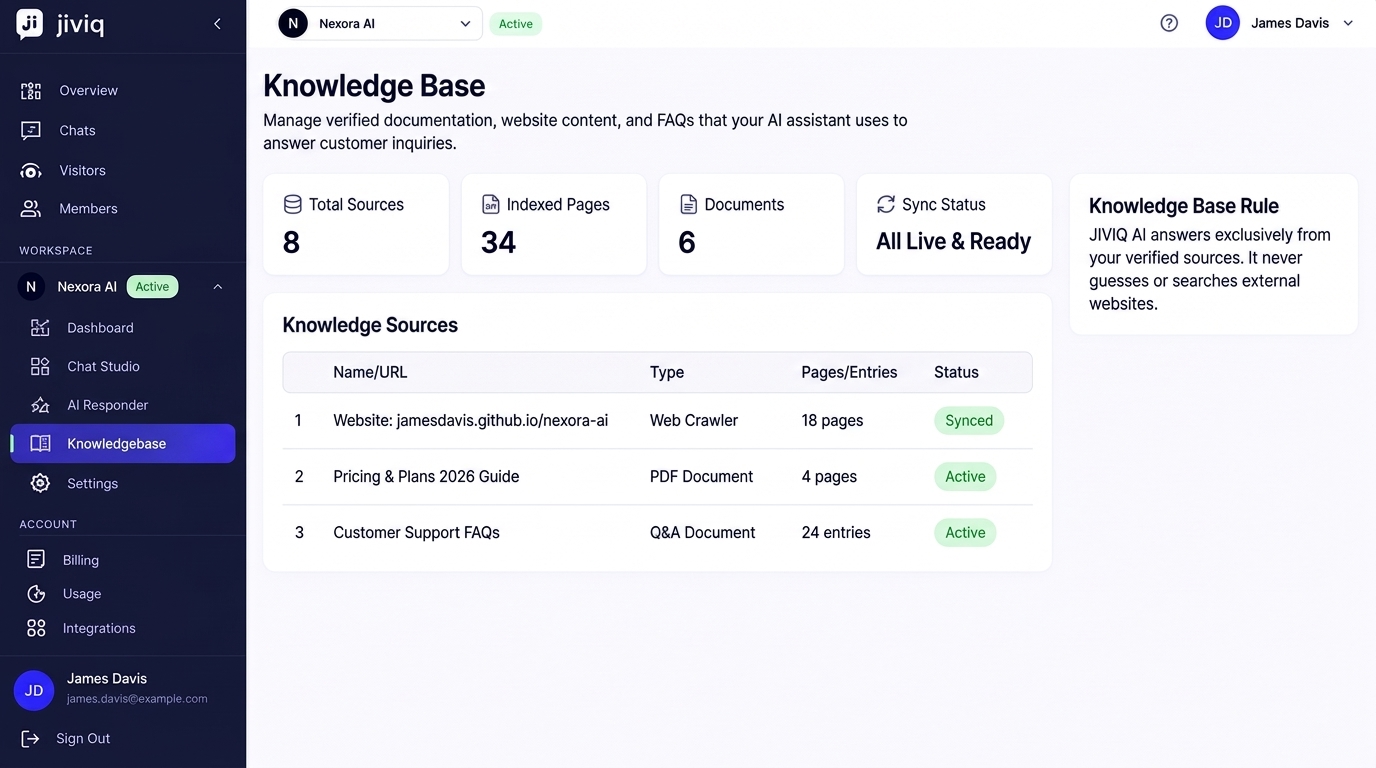
AI answers solely from your verified business materials.
Changes you make to docs or URLs reflect in live chats immediately.
Combine live web pages, PDFs, Word docs, and direct Q&As in one place.
2. Why JIVIQ Needs It
Modern Artificial Intelligence is capable of understanding complex human language, but it does not know the private details of your business. It does not know that your clinic is closed on alternate Thursdays, that your initial consultation fee is $85, or that you offer a 30-day money-back guarantee on select service tiers.
The Official JIVIQ Principle
JIVIQ AI answers strictly from the Knowledge Base and does not browse the internet or invent business information. We do not assume or pretend that AI automatically knows everything about your business out of the box. Your Knowledge Base is the sole factual authority your AI is permitted to use.
Without a Knowledge Base, an AI assistant would either have to refuse every specific inquiry or risk making up misleading answers (commonly called AI hallucination). By giving JIVIQ your Knowledge Base, you set clear boundaries and ensure your AI assistant speaks with the exact same authority and accuracy as a well-trained member of your staff.
3. What Kind of Information Can Be Added
You can populate your JIVIQ Knowledge Base with almost any text-based material your business already uses. You do not have to write new content from scratch.
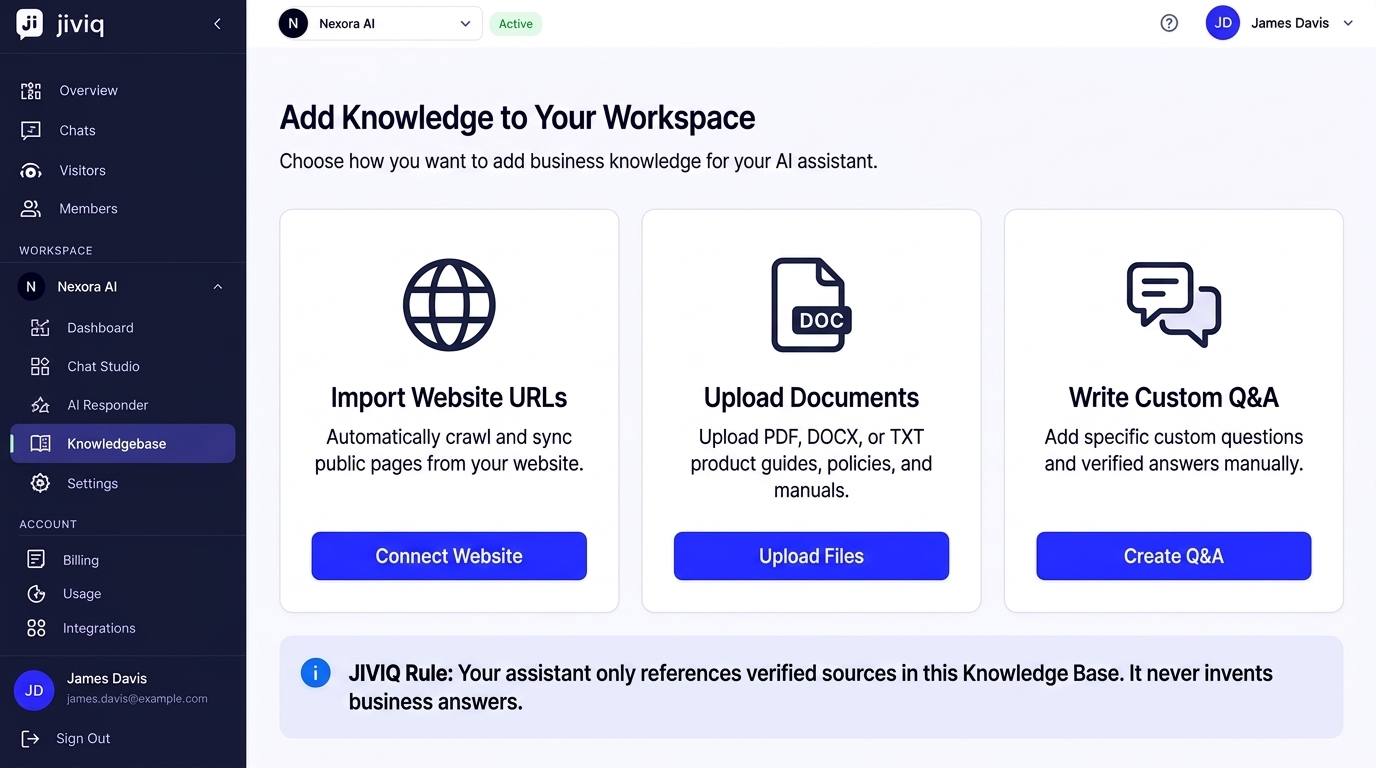
Website Pages & Sitemaps
Import your public marketing pages, service descriptions, pricing tables, team bios, and existing online FAQs with a single domain URL.
Uploaded Documents
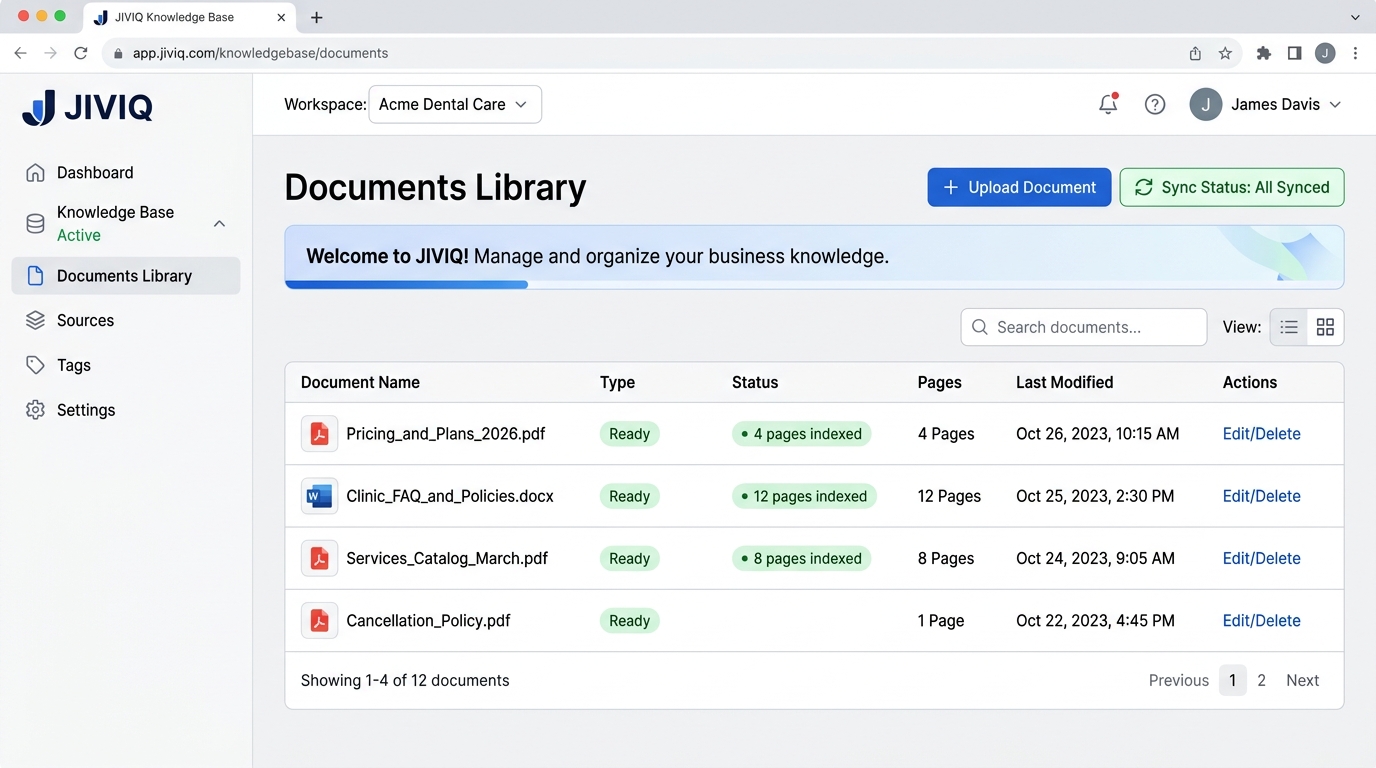
Upload PDF, Word (.docx), or text files containing customer onboarding manuals, terms of service, return policies, or internal process guides.
Custom Q&A Pairs
Directly input specific questions and answers for edge cases, special holiday hours, parking instructions, or seasonal promotions.
Support & Policy Snippets
Add brief informational memos explaining cancellation windows, warranty terms, or emergency phone numbers for after-hours care.
4. How JIVIQ Uses the Information When Answering Visitors
When a visitor types a question into the chat widget on your website, JIVIQ executes a streamlined 4-step retrieval and response process:
Intent Understanding
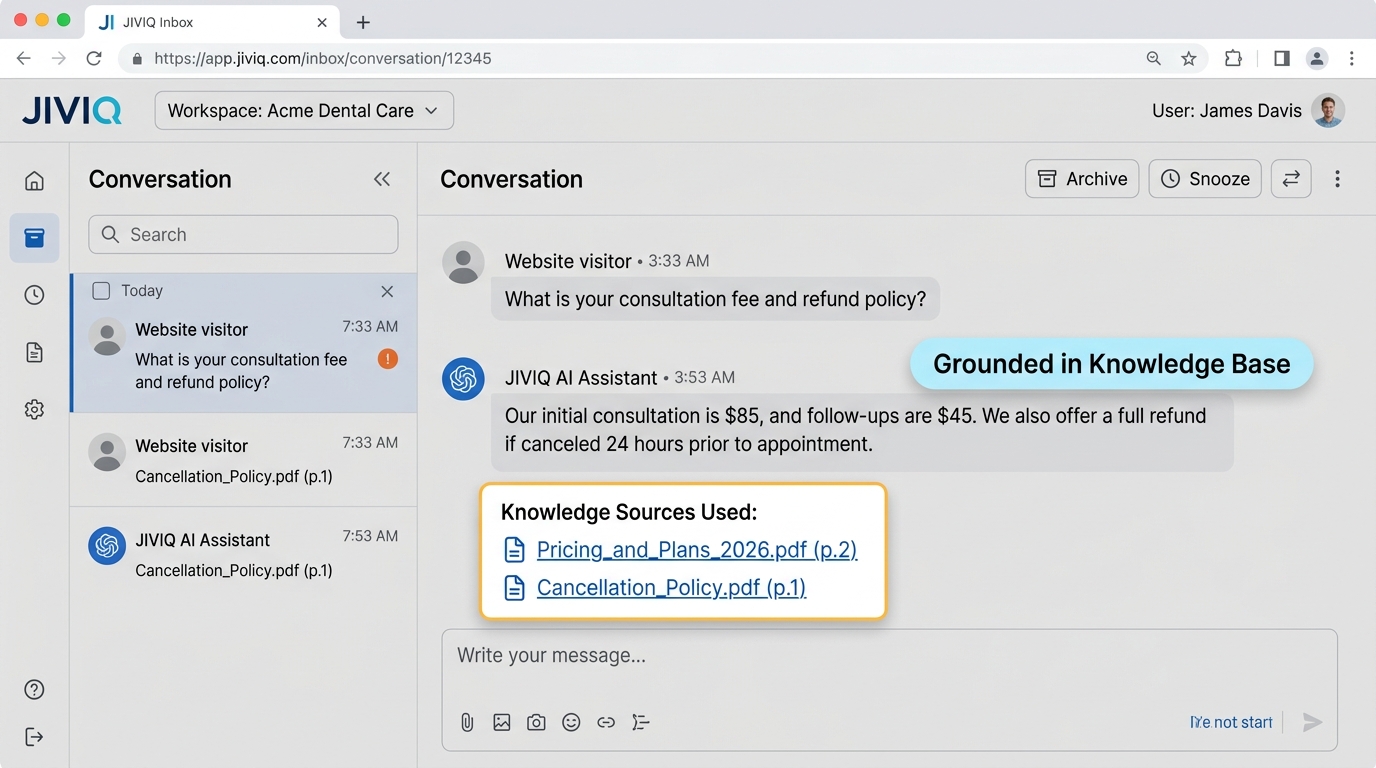
The visitor asks a natural question (e.g. "What is your consultation fee and refund policy?"). JIVIQ analyzes the meaning behind the query.
Semantic Search in Knowledge Base
JIVIQ scans your indexed documents and web pages to find the exact paragraphs matching consultation fees and cancellation rules.
Grounded Answer Generation
The AI drafts a polite, concise reply using only the retrieved facts (e.g. "Our initial consultation is $85, and we offer a full refund if canceled 24 hours prior to appointment.").
Source Citation & Transparency
The AI response is delivered to the visitor immediately, while the specific source files (e.g., Pricing_and_Plans_2026.pdf) are logged in your admin inbox for verification.
5. Why Accurate Business Information Matters
Your website visitors rely on the chat widget to make purchasing and booking decisions. If your Knowledge Base contains outdated information, your AI assistant will communicate those outdated details to prospective clients.
Accurate Knowledge Base
- Quotes current 2026 pricing and discount structures
- Informs visitors of exact holiday hours and closures
- Explains actual return and cancellation rules clearly
- Builds trust and converts high-intent website visitors into customers
Outdated or Missing Knowledge
- Risks quoting expired promotional rates or wrong consultation fees
- May confuse visitors regarding accepted insurance plans or payment methods
- Leads to customer frustration and extra support ticket escalations
- Requires human agents to intervene and issue price corrections
6. What Happens When the Answer Is Not in the Knowledge Base
One of the most important safety features of JIVIQ is its honesty. If a visitor asks a question that does not exist in any of your uploaded documents or synced web pages, JIVIQ will never make up a fictitious answer.
Polite Acknowledgment
The AI politely states that it does not have the exact details on file rather than guessing.
Human Agent Escalation
It offers to connect the visitor with a live human team member or prompt them to leave an email or phone number.
Inbox Notification
The conversation is flagged in your JIVIQ Inbox so your team can respond and add the missing answer to the Knowledge Base.
7. How Website Content & Uploaded Documents Become Knowledge
You might wonder how JIVIQ turns an entire website or a 30-page PDF into instantaneous answers. The process happens automatically behind the scenes in three steps:
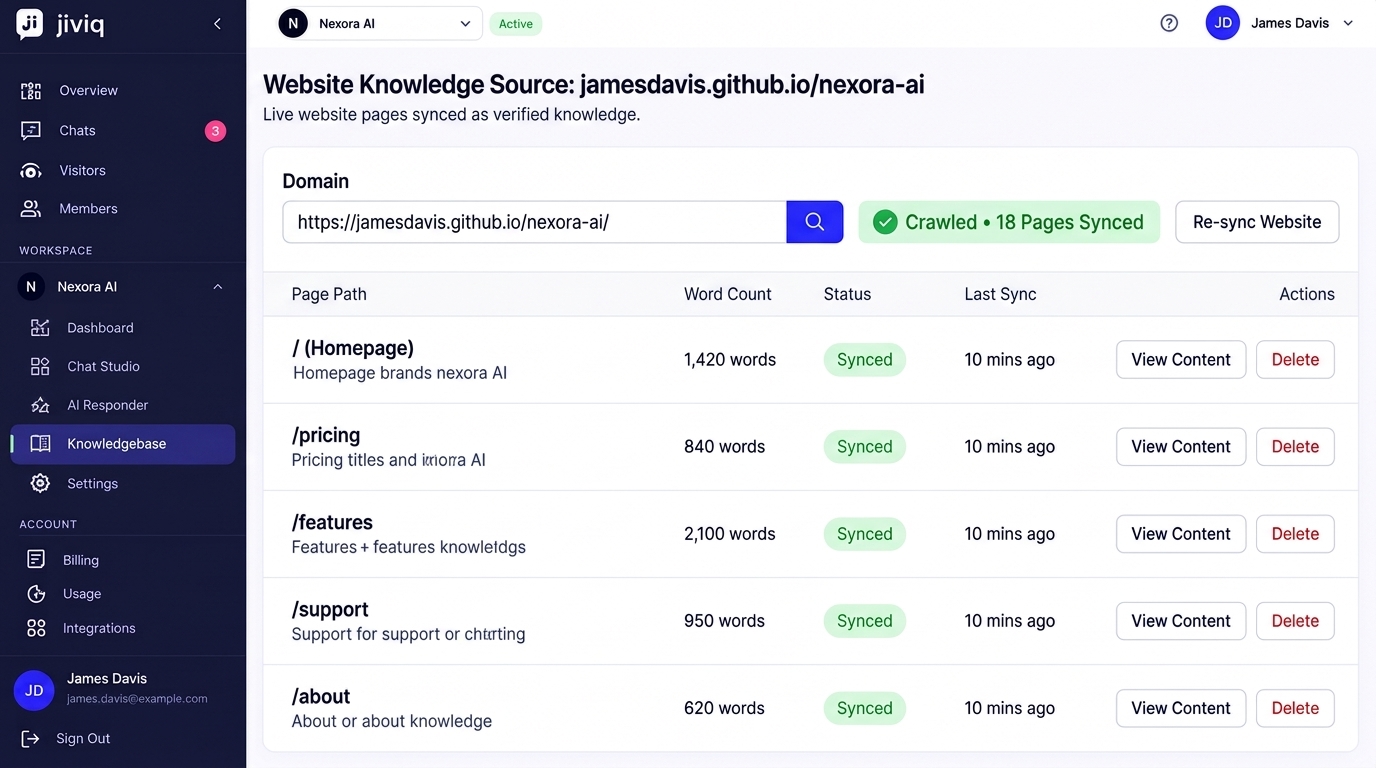
Extraction & Cleaning
JIVIQ strips out unnecessary HTML tags, navigation bars, cookie consent popups, and footers, leaving only high-value factual text.
Semantic Chunking
Long articles and documents are split into logical topical chunks (such as individual policy rules or service descriptions).
Vector Indexing
Each chunk is transformed into searchable semantic embeddings so JIVIQ can find relevant facts in milliseconds during live chats.
8. How the Knowledge Base Connects with the JIVIQ AI Responder
The Knowledge Base works directly in tandem with your AI Responder Settings. Depending on the mode you have selected for your workspace:
Autopilot Mode
The AI immediately and automatically replies to visitors using facts from your Knowledge Base 24/7 without requiring human approval.
Copilot Mode
When a customer asks a question, JIVIQ drafts a suggested answer based on the Knowledge Base and presents it to your human agent in the Inbox for one-click review.
9. Who Can Manage Knowledge Base Content
Managing your Knowledge Base is simple and secure. Access permissions ensure that only authorized team members can add or update business materials:
| Role | Add / Delete Sources | Trigger Sync | Edit Q&A Pairs | View Knowledge |
|---|---|---|---|---|
| Workspace Owner | check_circle Yes | check_circle Yes | check_circle Yes | check_circle Yes |
| Administrator | check_circle Yes | check_circle Yes | check_circle Yes | check_circle Yes |
| Support Agent / Editor | cancel Read-only | cancel No | check_circle Yes | check_circle Yes |
10. What You Should Do Next
Now that you understand what the Knowledge Base is and how it powers accurate AI conversations, it is time to build your own! Follow our step-by-step guides in sequence:
11. Frequently Asked Questions
Browse questions by category to learn all about configuring, syncing, and testing your JIVIQ Knowledge Base:
The Knowledge Base is your AI assistant's private reference library. It contains your verified business facts—such as service lists, pricing, opening hours, refund rules, and FAQs—so JIVIQ can answer customer questions accurately without guessing.
Not at all. You can build your Knowledge Base simply by typing your website link or dragging and dropping your existing PDF, Word, or text documents. JIVIQ reads, organizes, and indexes the content automatically.
A standard website FAQ is a static list of questions displayed on a web page. The JIVIQ Knowledge Base processes your entire business documentation so your AI can understand conversational visitor queries, extract exact facts, and compose friendly, immediate answers in real time.
No. JIVIQ operates on strict grounding: it only answers from the verified information stored in your Knowledge Base. It never browses the open web or fabricates policies, pricing, or services.
When JIVIQ cannot find a factual match in your Knowledge Base, it politely lets the visitor know it doesn't have that information and offers to transfer the conversation to a human team member or collect their contact details for follow-up.
Yes. Inside your JIVIQ admin inbox, every AI response displays the exact source document or webpage URL used to answer the question, giving you total transparency and auditability.
You simply enter your website address or sitemap URL. JIVIQ crawls your public pages, removes repetitive clutter like headers and footers, and converts your text into organized knowledge chunks.
Yes. JIVIQ can automatically re-sync your connected website pages on a scheduled interval, or you can click 'Sync Now' in your Knowledge Base dashboard whenever you publish major updates.
Yes. You have full control over your indexed URLs. You can select specific pages (like /pricing, /about, /services) and exclude private or irrelevant pages (like /login or /terms-of-service).
JIVIQ supports PDF (.pdf), Microsoft Word (.docx), Plain Text (.txt), and Markdown (.md) documents. You can upload pricing sheets, product catalogs, onboarding manuals, and customer support guides.
Yes. JIVIQ's document parser preserves table structures, section headings, and bullet points, allowing the AI to accurately extract tiered pricing, feature matrices, and tabular schedules.
You can replace or delete any document with a single click in your Knowledge Base document library. The old information is removed instantly, and the AI will use only your updated file.
Workspace Owners and Administrators have full access to add, edit, re-sync, and delete knowledge sources. You can also assign editor roles to support managers or team leads.
Knowledge Base updates take effect immediately. As soon as a document or webpage finishes indexing (usually within a few seconds), the AI begins using the new facts on all live customer chats.
Yes. JIVIQ provides an interactive Knowledge Base preview chat where you can ask test questions and see exactly how the AI responds and which sources it references before going live.